TCP Working: 3-way Handshake & Reliable Communication
Whenever you open a website, download a file, or hit an API, data travels across the internet in tiny pieces. Those pieces move through cables, routers, switches, and sometimes very unreliable networks.
Yet somehow, everything reaches the other side in the correct order, without missing data, and without corruption.
That “somehow” is TCP.
Let’s understand how TCP works — slowly, clearly, and without drowning in packet-level details.
What Is TCP and Why Is It Needed?
TCP (Transmission Control Protocol) is a communication protocol that sits at the heart of the internet.
Its responsibility is simple to say, but hard to implement:
Make sure data sent from one machine reaches another machine completely, correctly, and in order.
TCP is used by:
Web applications (HTTP / HTTPS)
File transfers
Emails
Most backend-to-backend communication
Any time reliability matters, TCP is involved.
What Happens If Data Is Sent Without Rules?
Imagine sending data without any protocol.
Suppose you send a long message broken into pieces:
Some pieces arrive late
Some arrive twice
Some never arrive
Some arrive out of order
Now imagine the receiver has no way to know:
What’s missing
What’s duplicated
When the message is complete
This is what network communication looks like without rules.
TCP exists to define those rules so both sides understand each other.
Problems TCP Is Designed to Solve
TCP was created to handle real problems that happen on networks every day.
Packet Loss
Networks are unreliable. Packets can simply disappear.
Out-of-Order Delivery
Packets may take different routes and arrive in the wrong sequence.
Duplicate Packets
The same packet might arrive more than once.
Data Corruption
Bits can flip while traveling across the network.
TCP doesn’t prevent these problems — it detects and fixes them.
What Is the TCP 3-Way Handshake?
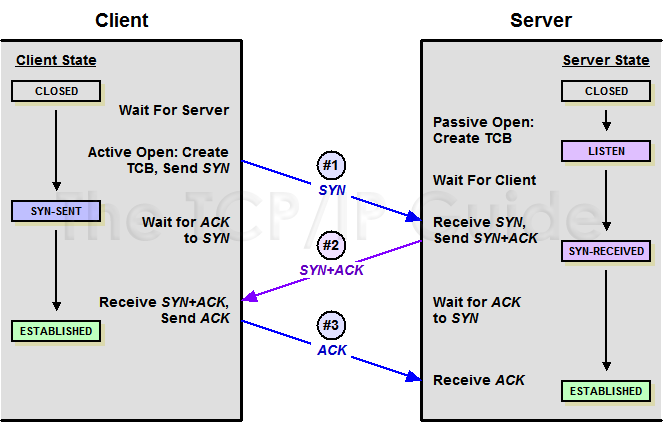
Before sending actual data, TCP first establishes a connection using the 3-Way Handshake.
Think of it like starting a conversation:
“Are you there?”
“Yes, I’m here.”
“Great, let’s talk.”
Only after this exchange does real communication begin.
Step-by-Step: SYN, SYN-ACK, and ACK
Step 1: SYN
The client sends a packet with the SYN flag:
“I want to start a connection, and this is my starting sequence number.”
Step 2: SYN-ACK
The server replies with SYN + ACK:
“I acknowledge your request, and here is my own starting sequence number.”
Step 3: ACK
The client sends an ACK:
“I acknowledge your sequence number.”
The connection is now established.
TCP 3-Way Handshake Diagram
How Data Transfer Works in TCP
After the handshake:
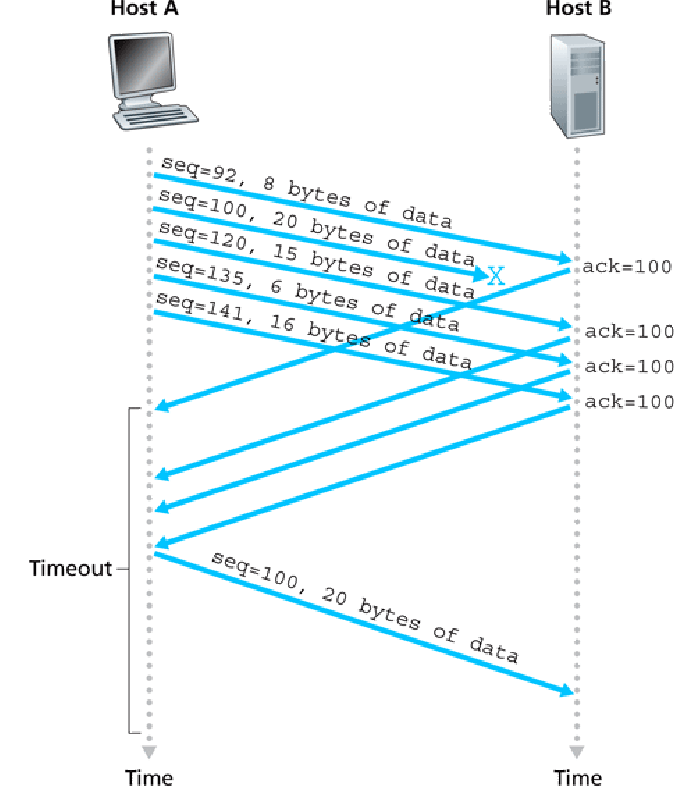
Data is split into segments
Each segment has a sequence number
The receiver sends acknowledgements
This turns unreliable networks into a reliable data stream.
Sequence Numbers & Acknowledgements
Sequence Number: where the data fits in the stream
ACK Number: what data has been successfully received
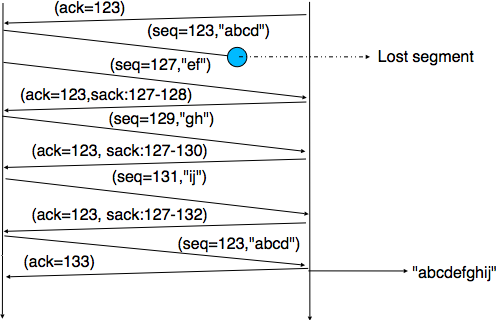
Missing ACKs signal packet loss.
How TCP Ensures Reliability
TCP ensures:
Reliability via retransmissions
Order using sequence numbers
Correctness via checksums
Flow control to avoid overload
Congestion control to adapt to network conditions
Packet Loss & Retransmission Diagram
How a TCP Connection Is Closed
TCP closes connections gracefully using FIN and ACK flags.
Connection Termination Steps
FIN – “I’m done sending data”
ACK – “Acknowledged”
FIN – Other side finishes
ACK – Final confirmation
Final Thoughts
TCP is careful by design. It confirms, tracks, retries, and closes connections politely.
Understanding TCP gives you a strong foundation in networking and backend systems.